Posts

My Love & Relationship Tracker: Your Partner In Love

Image
Free Love Tracker App Love is an essential part of life. It's the emotion that makes the world go round and turns the mundane into magic. But, like everything else in life, love and relationships need to be nurtured and managed. That's where the " My Love & Relationship Tracker " comes in. This is a free love tracker app designed to help you keep your love life on track. Whether you're in a new relationship or have been with your partner for years, this app can help you keep the spark alive. Daily Selected Category Quotes Notification Words have the power to inspire, motivate, and bring people closer. The " My Love & Relationship Tracker " app sends you daily selected category quotes notifications. These quotes, handpicked from various categories, can help you express your feelings better and keep the love and romance alive in your relationship. From romantic to funny, from sweet to sassy, you will get a variety of quotes to suit your mood and th...

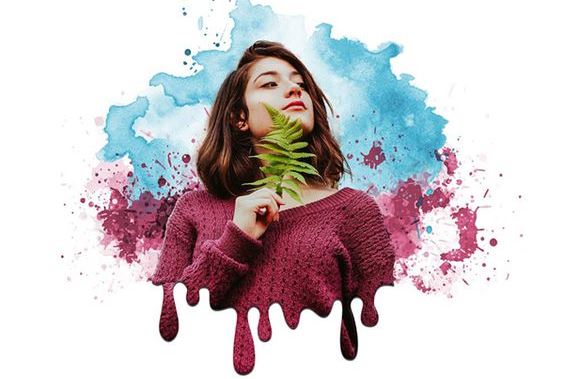
Как начать редактировать фотографии с мобильного телефона

Image
В современном визуально ориентированном мире превратить обычные фотографии в захватывающие произведения искусства стало проще, чем когда-либо. С помощью приложения PicShot - Background Eraser  вы можете бесплатно получить доступ к мощным платным функциям редактирования фотографий. Давайте углубимся в основы редактирования фотографий на мобильных устройствах с помощью этого невероятного инструмента. Шаг 1. Загрузите PicShot Загрузите PicShot из своего магазина приложений: Шаг 2. Импортируйте свою фотографию Выберите любое изображение из своей галереи, чтобы начать редактирование. Шаг 3. Примените фильтры Поэкспериментируйте с фильтрами, чтобы придать вашей фотографии уникальный вид. Отрегулируйте интенсивность по своему вкусу. Шаг 4. Добавьте текст и графику Украсьте свою фотографию текстом, фигурами, наклейками или собственными рисунками. Персонализируйте свои подписи и стиль. Шаг 5: Изучите капельное искусство Создавайте потрясающие эффекты капель на своих фотографиях, используя р...

Enhance Your Photos with PicShot - Background Eraser

Image
Are you an Apple user looking to take your photo editing skills to the next level? Look no further than PicShot - Background Eraser , an incredible photo editing app that offers a range of premium features for free. Among these features, the Drip effect stands out as a powerful tool to make your photos more attractive and engaging. In this blog post, we'll walk you through the step-by-step process of using the Drip effect in PicShot, so you can transform your photos into eye-catching works of art. How to use The Drip effect: Step 1: Download and Install PicShot Before you can start using the Drip effect, you'll need to download and install the PicShot  app from the Apple App Store. Simply search for " PicShot - Background Eraser ," and once you've found it, tap the "Install" button to get it on your device. Step 2: Open the App and Select a Photo After the installation is complete, open the PicShot app. You'll be greeted with a clean and user-friendl...

Mastering Collage Creation: A Guide to PicShot's Free and User-Friendly Collage Maker

Image
In the age of smartphones, photo editing has become an integral part of our daily lives. Whether it's enhancing the colors of a sunset, adding a touch of creativity to a selfie, or creating collages to capture precious memories, we all love to experiment with our photos. If you're an Apple user looking for an impressive photo editing app that provides a wide range of features for free, look no further than PicShot - Background Eraser . In this blog post, we'll explore one of the app's standouts: the collage maker. We'll guide you through the steps to use this feature and show you how to create stunning collages effortlessly. What is PicShot - Background Eraser? PicShot - Background Eraser is a powerful and user-friendly photo editing app available for Apple users. It boasts a plethora of features that allow you to take your photos to the next level. From adding text and stickers to applying filters and effects, this app has it all. One standout feature that sets...

Makeover of photo background with PicShot - Background Eraser

Image
In today's digital age, photo editing has become an essential tool for anyone looking to enhance their photos and make them truly stand out. Whether you're a professional photographer or just someone who enjoys sharing moments on social media, having a reliable photo editing app can make a world of difference. One such app that has gained popularity for its versatility and powerful features is PicShot - Background Eraser . Among its many features, the background eraser stands out as a handy tool for creating eye-catching images. In this blog post, we'll walk you through the steps to use the background eraser feature in PicShot. Why Use PicShot - Background Eraser ? Before we dive into the background eraser feature, let's briefly explore why PicShot is worth considering for your photo editing needs. PicShot is known for its user-friendly interface and a wide range of features that allow you to unleash your creativity. Whether you want to add text to your photos, create s...

Drip & Text Magic: Introducing PicShot, Your Photo Transformation App

Image
  In the age of Instagram, Snapchat, and countless other visual platforms, photo editing has become a ubiquitous skill. Whether you're a social media influencer, a professional photographer, or simply someone who wants to spruce up their vacation snaps, having the right editing tools at your disposal is essential. Enter PicShot - Background Eraser , a photo editing application that's making waves with its extensive array of filters and editing capabilities. In this post, we'll walk you through the steps of using PicShot's filters and showcase a compelling before-and-after comparison. The Power of Filters in PicShot - Background Eraser Filters are like magic wands for your photos. They can instantly transform a dull or ordinary image into a visually striking masterpiece. PicShot - Background Eraser understands this, and that's why it offers a diverse range of filters to help you unleash your creativity. How to Use Filters in PicShot - Background Eraser? Let's di...

Unleash Your Artistic Vision with PicShot - Background Eraser - An Exclusive Apple App Store Gem

Image
In a world driven by visual storytelling, every picture we capture tells a unique story. But what if you could elevate those stories to new heights with a touch of creativity? Introducing PicShot - Background Eraser , an exclusive gem on the Apple App Store that transforms your photos into captivating works of art. Tailored for Apple users, this app is a creative powerhouse, combining the best features of popular tools like PicsArt, Collage Maker, and Pixel Art, while offering an array of unique functionalities to set your photos apart. The Magic of Photo Editing Apps Photo editing apps have revolutionized the way we perceive and share images. With the rise of social media platforms like Instagram and Snapchat, the ability to enhance and personalize photos has become an essential skill. PicShot takes this concept to a whole new level, allowing users to craft visual narratives that go beyond the ordinary. Unlocking the Potential of PicShot - Background Eraser PicShot isn't just a...